
Build a VFD maintenance schedule that fits your plant. Covers risk-based frequency, seasonal checks, shutdown tasks, and ready-to-use inspection templates.
You know the feeling. A drive cabinet looks clean, the logbook is current, and the last round of inspections came back fine, then a hot afternoon rolls in, the line gets loaded, and one VFD trips anyway. That's usually the moment teams realize a vfd maintenance schedule can't just be a calendar with boxes to tick.
A schedule that works in a steel bay, a tire line, or a chemical area has to follow the failure mechanism, not just the date. Contamination, thermal stress, vibration, and capacitor aging are the four realities that keep showing up inside cabinets, and the maintenance plan has to be built around them. That's why the strongest programs use inspection layers, environment-specific cadence, and lifecycle decisions together, instead of treating preventive care as a generic monthly chore.
Table of Contents
- Why a Fixed Calendar Schedule Is Not Enough
- The Four Inspection Layers at the Core
- Adjusting Frequency to Your Plant Reality
- Building a Routine Inspection Walk-Through
- Seasonal Checks and Calendar Anchors
- Shutdown Tasks You Cannot Do on a Running Drive
- From Schedule to Lifecycle Decision
Why a Fixed Calendar Schedule Is Not Enough
A drive can look healthy right up until the day it doesn't. I've seen cabinets with clean inspection records still trip during a heat wave, because the cabinet's real problem wasn't visible on paper, it was rising internal stress that had been building for months. The schedule was technically followed, but it missed the operating conditions that were shortening component life.
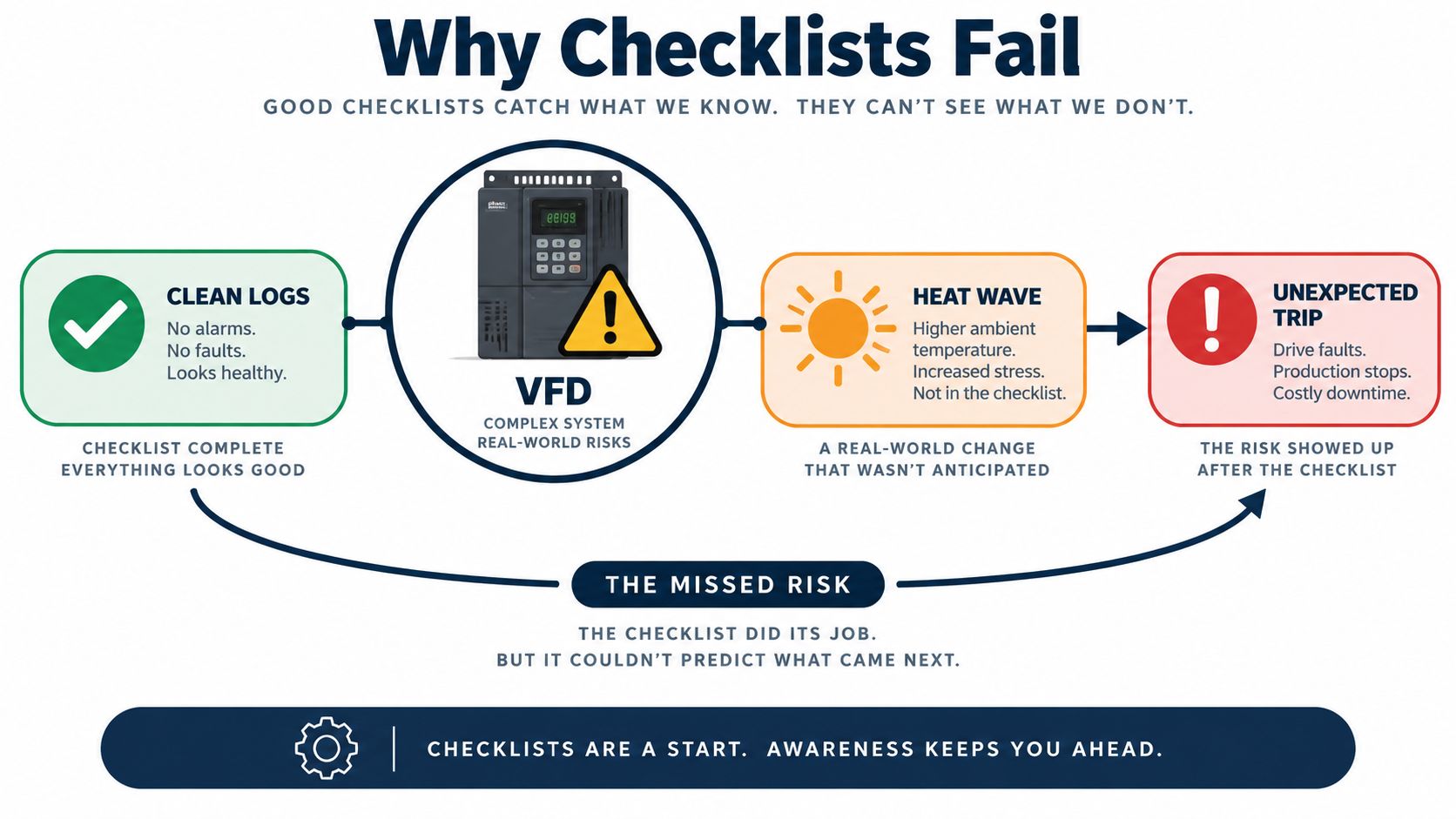
The mechanism matters more than the date
A defensible VFD maintenance schedule starts with the mechanisms that kill drives. Dust and moisture restrict cooling and contaminate boards. Heat raises internal temperatures and accelerates wear. Vibration loosens terminations. Capacitors age whether the cabinet looks tidy or not.
That's the wrong place to rely on a fixed checklist alone. A monthly round in a clean utility room and a monthly round in a carbon-black process area are not the same job, even if the form sheet looks identical. The right question is not, “Did we do the monthly task?” It's, “What failure mode is this task supposed to catch, and how fast is that failure mode moving in this plant?”
Practical rule: if a task doesn't map to a real risk in your cabinet, it belongs lower on the list or on a different cadence.
Most public guidance still treats maintenance as a fixed monthly or quarterly routine. That works as a starting point, but it misses the fact that climate, duty cycle, loading, and asset age change how fast problems develop. The same drive that can wait for quarterly cleaning in a conditioned electrical room may need more frequent checks near corrosive vapors, high humidity, or heavy thermal cycling.
For a deeper condition-based mindset, it helps to connect maintenance data to operating history and not just calendar dates, which is where a digital maintenance model becomes useful in principle, even when the site isn't ready for full automation. See how a digital twin approach supports condition-based planning.
Build the schedule around risk, not frequency
The strongest schedule is usually not the most frequent one. It's the one tied to the mechanism that's most likely to fail first in that environment. In a dry, low-dust room, the emphasis may stay on parameter review and routine airflow checks. In harsher areas, the same schedule needs tighter inspection intervals, more aggressive cleaning, and earlier intervention on cooling parts.
That shift matters because the schedule is supposed to protect the asset, not punish the crew with unnecessary work. If the plant environment is steady, the schedule can stay lean. If the cabinet lives in heat, salt, dust, or vibration, the schedule has to tighten around those stresses.
The Four Inspection Layers at the Core
A drive room can look orderly at the start of the month and still be carrying hidden problems inside the cabinet. The failure mode often changes before the symptom does. Thermal drift, loose hardware, clogged airflow paths, and aging capacitors usually show up on different timelines, so the inspection plan has to follow those timelines instead of treating every check as the same job.
Layered cadence that crews can reliably run
The common structure is monthly visual and airflow checks, quarterly cleaning and torque verification, semi-annual internal inspection with thermal imaging, and an annual performance and harmonics review with component-life planning. That cadence is spelled out in maintenance checklists, along with monthly fault-code logging, quarterly parameter backups, and annual evaluation of fans and DC bus capacitors as wear items.
| Four-Layer VFD Maintenance Rhythm | Cadence | Main Tasks | Failure Mechanism Caught |
|---|---|---|---|
| Layer 1 | Monthly | Visual check, airflow check, fault log review | Dust buildup, blocked cooling, early warning signs |
| Layer 2 | Quarterly | Cleaning, torque verification, parameter backup | Loose terminations, contamination, setpoint drift |
| Layer 3 | Semi-annually | Internal inspection, thermal imaging | Hot spots, fan degradation, hidden thermal stress |
| Layer 4 | Annually | Performance review, harmonics review, component-life planning | Aging capacitors, long-term drift, obsolescence risk |
The logic behind the layers is practical. Airflow restriction and dust loading usually start the failure chain, so those checks belong at the front of the schedule. Loose terminations and drifting parameters tend to show up after that, which is why torque checks and parameter comparison sit in the next pass. By the time the crew reaches thermal imaging and annual review, the work is aimed at trends a quick walk-by will miss.
What happens when a layer gets skipped
Skipping the first layer removes the easiest warning signs, clogged intake, blocked exhaust, condensation, or grime around vents. Skip the torque layer and heat builds at the terminals, arcing becomes more likely, and nuisance trips follow. Skip thermal imaging and the crew often does not see the problem until a part is already running too hot to trust.
A good layer catches the problem before the next layer has to prove it.
That is why a year-long rhythm works better than a single annual shutdown checklist. The monthly rounds keep the cabinet honest, the quarterly work corrects what routine dust and drift create, the semi-annual checks catch hidden heat, and the annual review tells operations what the drive is becoming, not just what it looked like on the last inspection.
Adjusting Frequency to Your Plant Reality
A clean utility room and a coastal steel mill should not run the same cadence. That sounds obvious, but a lot of plants still copy a schedule from a generic template and then wonder why the drive room keeps heating up or why filters clog early. The interval has to follow the site stress, not the page layout.
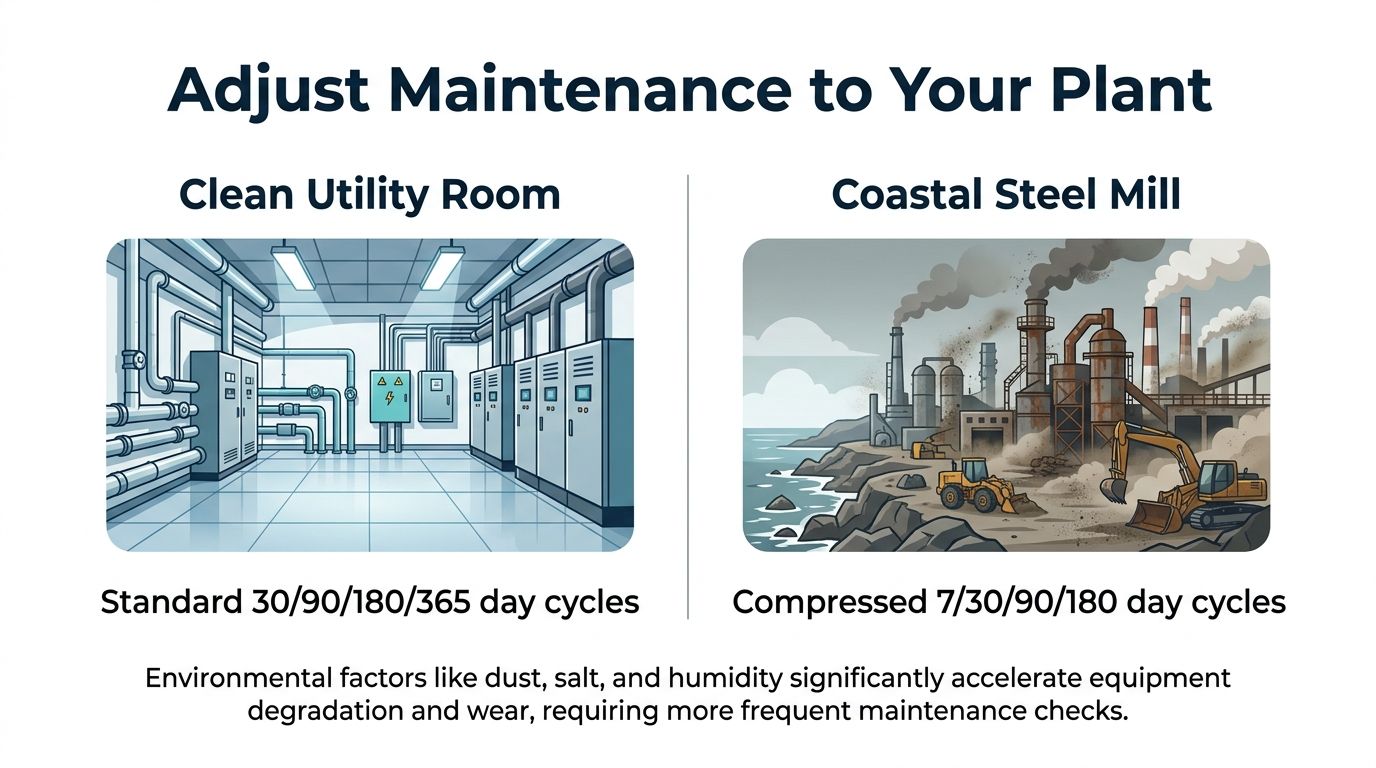
Clean rooms and harsh sites need different clocks
In a clean utility room, standard monthly, quarterly, semi-annual, and annual cycles can work well if airflow is stable and fault history stays quiet. In a coastal steel mill, the schedule usually needs tighter visual checks and more frequent cleaning because salt, dust, and heat work together. A tire plant with carbon black contamination often needs the same kind of compression, because fine dust loads filters and coats heat sinks faster than operators expect.
Chemical sites bring a different problem. Corrosive vapors can attack connectors and surfaces even when the cabinet looks only lightly soiled. That means the maintenance team has to watch for both contamination and degradation, not just dirt accumulation.
Use measurements to justify the cadence
The cleanest way to defend a custom schedule is to log ambient temperature, humidity, DC bus voltage, and fault history, then adjust intervals from those records. If the cabinet routinely runs hotter than expected, the calendar should shorten around cooling checks. If fault codes cluster after humid weather or production surges, the interval around inspection and thermal scanning needs to tighten.
Practical rule: the best schedule is tied to contamination, thermal stress, vibration, and capacitor aging, not to a generic monthly or quarterly label.
That's also why the same site can need different rhythms across its own plant. A utility room drive may stay on standard timing while a process area drive gets more frequent visual checks and earlier internal inspections. The point isn't to over-maintain everything. It's to spend attention where the operating stress is real.
The contrarian view is often the right one here, the most frequent schedule is not automatically the best schedule. The best schedule is the one that matches the cabinet's actual risk profile. Once a reliability manager sees the data trail, the cadence usually stops looking like opinion and starts looking like risk control.
Building a Routine Inspection Walk-Through
The most useful routine inspection is the one a technician can perform in the same order every time without skipping the steps that protect the later ones. Start with airflow and the environment, because a dirty, hot, or damp cabinet makes every other observation less trustworthy. Then move through the electrical work, and only after that do thermal or functional testing.
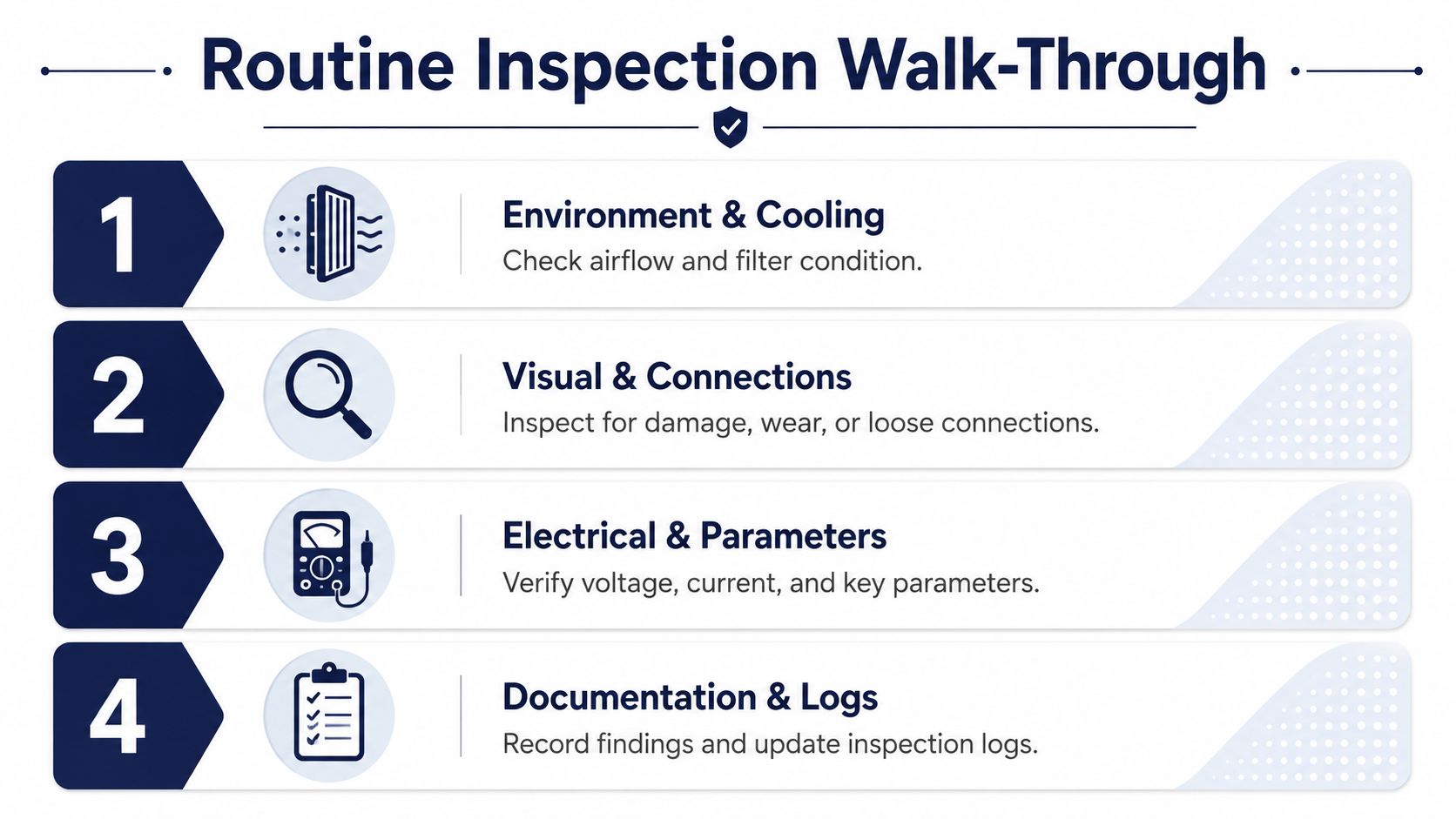
Start with cooling and the cabinet environment
Check filter condition, cabinet airflow, ambient temperature, and any sign of dust or moisture ingress. This is the first gate because cooling problems distort everything else that follows. If the enclosure is packed with dust, there's no point pretending the drive is still in a normal operating state.
Look at the cabinet as a system, not as a collection of parts. A blocked intake can be as damaging as a failed fan, because both lead to trapped heat. Moisture stains, rust, or residue around the lower section usually tell you more than a clean faceplate does.
Move to terminations and parameter baseline
After the environment checks, re-torque the power and control terminations. Loose connections create heat, and heat creates more looseness, so this is one of the few tasks that can stop a small defect from turning into a cabinet event. Once the hardware is secure, compare live parameters against the saved baseline.
That comparison catches altered setpoints, drift, and unauthorized changes before they turn into process issues. It's also the point where a good technician separates an electrical problem from a configuration problem. If the baseline has moved, the drive may be healthy but mis-set. If the baseline is intact and the drive still misbehaves, the problem is probably deeper.
Finish with tests and documentation
Only after the cabinet is clean, secure, and compared against its baseline should you run functional or thermal tests. Then close the loop by reviewing fault logs, verifying parameter backups, and recording notes on DC bus voltage and harmonics. That record becomes the next technician's starting point instead of a pile of disconnected observations.
The workflow is sequential on purpose. A dirty cabinet makes thermal results noisy. Loose terminations make temperature readings meaningless. Bad parameter discipline makes fault history hard to trust. If the routine stays in order, the inspection tells a coherent story instead of a stack of guesses.
<iframe width="100%" style="aspect-ratio: 16 / 9;" src="https://www.youtube.com/embed/KFVh8YPwQSg" frameborder="0" allow="autoplay; encrypted-media" allowfullscreen></iframe>Put the environment first, the torque second, the parameters third, and the tests last. That sequence saves time and reduces bad calls.
Seasonal Checks and Calendar Anchors
A calendar still helps, as long as it anchors the right work at the right time. Spring is the best time to inspect for humidity-related issues and prep cooling before summer loads climb. Summer should focus on thermal stress, fan health, and cleaning parts that collect heat and dust.

Match the season to the stress
Autumn is a natural window for semi-annual internal inspection and thermal imaging before winter access gets harder. Winter is usually the right time for harmonics review, parameter baseline refresh, and planning shutdown windows. That timing lines up maintenance work with the periods when the plant can support it.
The season itself matters less than the stress it brings. High humidity, heat, cold starts, and production surges all affect how a drive ages. A team that watches only the clock can miss those shifts, while a team that ties work to the plant's seasonal load pattern can catch them early.
Fit the schedule to local operations
Local monsoon periods, harvest windows, outage seasons, and production peaks can all affect access. A site that loses easy cabinet access during one part of the year should pull inspection work forward, not wait until the ideal date has already passed. The same is true for facilities that shut down by campaign, batch, or turnaround cycle.
The useful habit is to map tasks to real plant windows instead of forcing the plant to fit the maintenance template. That keeps the schedule practical. It also reduces the chance that a drive is opened during the worst possible operating period.
A seasonal rhythm works best when it supports the layered schedule above, not when it replaces it. The calendar anchors the work. The failure mechanism decides how deep the work should go.
Shutdown Tasks You Cannot Do on a Running Drive
Some work belongs in a planned outage. You can't do a proper full cabinet vacuum, deep heat-sink cleaning, or internal fan inspection on a live drive, and you shouldn't try to fake that work with a quick external wipe. Shutdown windows are where the deeper interventions belong.
The same is true for capacitor bank visual checks, control board inspection, firmware version review, and spare-parts compatibility verification. Those tasks are only useful when the drive is isolated and the team can inspect the parts that normal rounds never reach. A live cabinet can show you symptoms, but not enough of the structure to make the next-year decision with confidence.
What to fold into planned outages
A solid outage package usually includes:
- Full cabinet vacuuming and interior inspection.
- Deep cleaning of heat sinks and fans.
- Capacitor bank checks for bulging, leakage, or other visible wear.
- Thermographic survey under load so you have a comparison point for the next cycle.
- Control board inspection for residue, discoloration, or damage.
- Firmware review and backup validation.
- Spare-parts compatibility checks so replacement decisions don't stall later.
That work is easier to manage when it sits inside a planned shutdown scope instead of drifting into emergency repair. The smart move is to capture baseline thermal images during the outage, label them clearly, and store them with the drive's record. Next time the cabinet runs hot, the comparison point is already there.
There's also a useful planning link between shutdown work and lifecycle risk. A planned outage is the right moment to decide whether a drive still has acceptable service life, needs targeted repair, or should be placed on a replacement path. See how planned shutdowns support deeper drive work.
Practical rule: if a task needs the cabinet open, isolated, and documented, it belongs in an outage plan, not on a routine walk-down.
From Schedule to Lifecycle Decision
A drive schedule only pays off when it changes the next decision. If the maintenance record keeps showing rising DC bus ripple, climbing capacitor temperature, or repeated fan alarms, those are not just service notes. They're the evidence trail for deciding whether the asset should stay in preventive care, go into targeted repair, or move to upgrade or replacement.
That's where the schedule stops being paperwork and starts becoming asset strategy. A cabinet that stays stable after cleaning, torque correction, and parameter restoration can keep running under preventive care. A drive with a bad fan assembly or a local component issue may justify deep repair or on-site reconditioning. A late-life unit with repeated wear signs, hard-to-match parts, or a compromised control section may be better treated as a replacement candidate.
The useful part of the schedule is that it gives operations and procurement something defensible. Nobody has to guess whether a trip was random or predictable when the trend record shows the same stress pattern month after month. The evidence makes the lifecycle call easier to explain, easier to budget, and easier to defend when downtime is on the line.
DUCHENG Industrial supports that same lifecycle view with preventive care, controlled restart support, deep repair, on-site reconditioning, and spare-parts compatibility checks for VFD assets across industrial sites. If you're tightening a vfd maintenance schedule around real failure mechanisms and need practical help turning inspection data into a repair or replacement decision, visit DUCHENG Industrial to discuss the right service path for your plant.