
A practical guide to AC drive repair for plant teams. Covers common faults, on-site triage vs deep repair, MV reconditioning, and repair vs replace decisions.
At 03:14, a forced-draft fan stops and the operator sees an overcurrent alarm. Production begins throttling back, the standby equipment isn't ready, and the maintenance manager has roughly an hour to decide whether to call the OEM, contact a specialist, or pull the spare drive from stores. That decision is more important than the first reset.
AC drive repair starts with triage, not soldering. The team must establish whether the drive caused the event, whether the motor or process created the symptom, and whether the asset deserves an on-site recovery, workshop repair, medium-voltage reconditioning, or replacement. The quality of those first checks often determines whether the interruption remains a short operational incident or becomes a prolonged outage.
Table of Contents
- When the Drive Trips and the Clock Starts
- What AC Drive Repair Actually Covers
- The Fault Families Behind Most AC Drive Repairs
- On-Site Rapid Triage vs Deep Workshop Repair
- Deciding Whether to Repair or Replace the Drive
- On-Site Reconditioning for MV Drives and Spare-Part Strategy
- Service Levels, Timelines, and What to Demand from a Provider
- A Practical Checklist for Your Next Drive Event
When the Drive Trips and the Clock Starts
The first person called shouldn't be asked to guess the failed component. They should receive the drive model, power rating, application, alarm code, fault history, last known operating condition, and a clear description of what happened immediately before the trip. A fan that trips during acceleration presents a different diagnostic path from a fan that trips after hours of hot operation.
Before anyone resets the drive, the shift team should preserve the evidence:
- Capture the display: Photograph the active alarm, secondary messages, and any keypad status screens.
- Save the history: Download or record the stored fault log if the drive permits it.
- Record the process state: Note motor speed, commanded frequency, load condition, damper position, and whether the trip followed a power interruption or process change.
- Protect the parameter set: Confirm the latest backup and avoid loading an old file just to get production moving.
- Check the surroundings: Record cabinet temperature, filter condition, visible moisture, contamination, fan operation, and unusual smell or noise.
The manager also needs to identify the people who can answer different parts of the problem. The electrical supervisor can confirm incoming supply conditions and safe isolation. The automation engineer can review commands, interlocks, and recent parameter changes. The operations lead can explain whether the fan, motor, or process behaved abnormally. The repair provider needs this information before dispatch, not after a technician has already opened the cabinet.
Practical rule: A fault code is evidence, not a root-cause statement.
If the team treats every overcurrent alarm as an internal drive failure, it may replace a healthy converter while the motor, cable, bearing, damper, or driven load remains defective. Guidance on drive troubleshooting also stresses confirming the actual performance complaint and checking whether the drive is the source of the problem before choosing repair work. The first call should therefore be a diagnostic briefing, not a request for “a replacement board.”
What AC Drive Repair Actually Covers
An AC drive is a solid-state power converter installed between the electrical supply and the motor. It converts incoming AC power, regulates the intermediate DC link, and uses an inverter stage to produce controlled output for motor speed and torque. The control system coordinates those stages with feedback from the application and operating parameters.
A useful mechanical analogy is a gearbox with an electronic driver:
- Rectifier: The input stage accepts the supply and converts it into DC.
- DC link: The intermediate energy section smooths and stores electrical energy.
- Inverter: The output stage uses switching devices, commonly IGBTs, to create the motor waveform.
- Control board: The driver decides how the system responds to commands, feedback, limits, and protection signals.
Repair can therefore mean several different levels of work. Rapid on-site intervention may involve inspection, fault-log analysis, parameter verification, cooling checks, safe testing, and replacement of an available subassembly. A workshop repair goes further, with controlled disassembly, board inspection, power-module testing, PCB rework, cleaning, re-coating where appropriate, and functional testing under controlled conditions.
For larger medium-voltage equipment, on-site reconditioning can be the practical alternative to shipment. The service team may replace power-stack modules, gate-driver boards, capacitors, connectors, or cooling components inside the installed cabinet, then recommission the system without moving the complete drive.
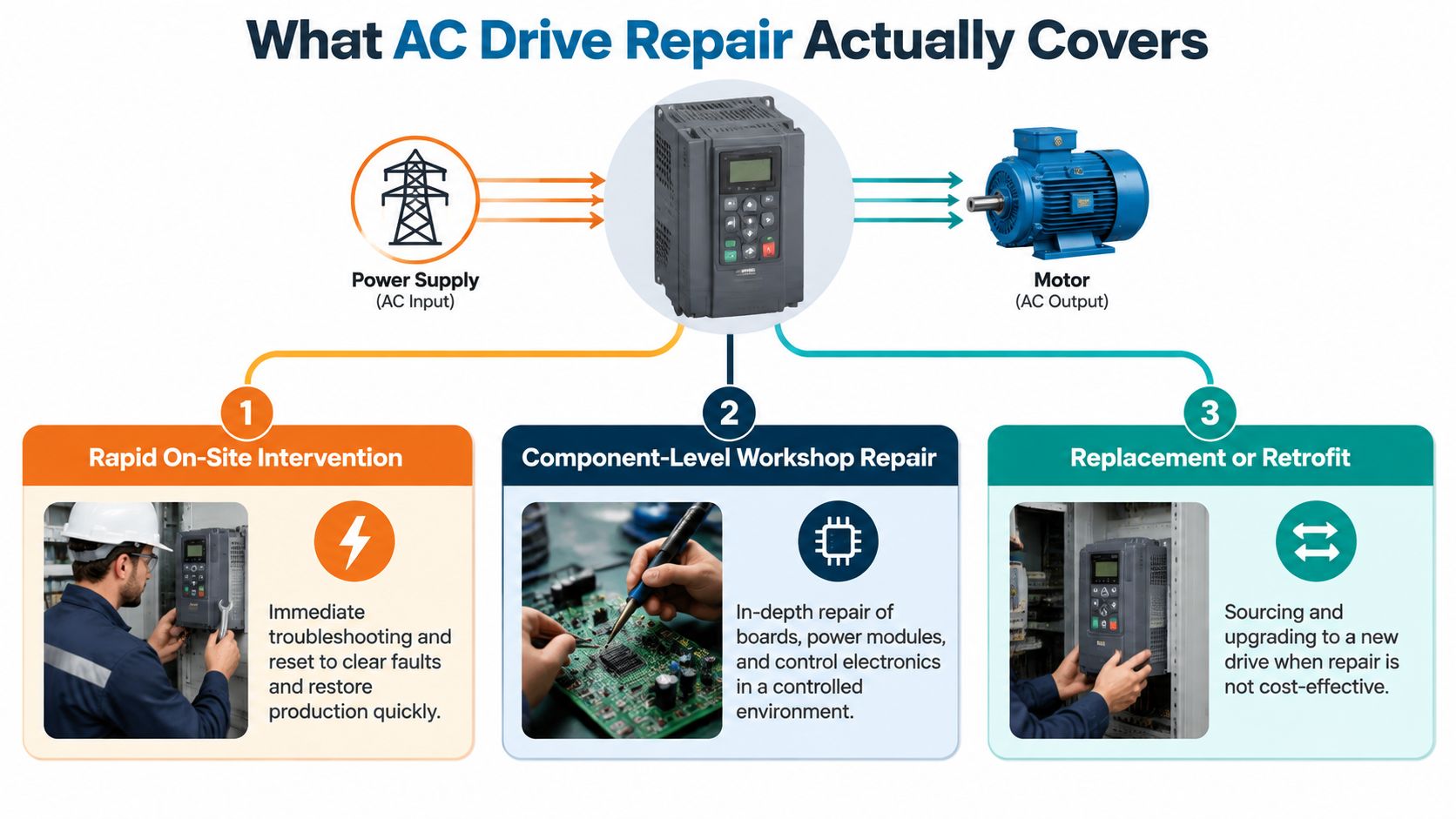
That scope differs from motor repair. A motor repair shop works on windings, bearings, insulation, rotor condition, and mechanical balance. AC drive repair concerns the converter and its control, power, cooling, and protection circuits. Commissioning is different again. It verifies installation, parameters, direction, ramp behavior, protection settings, and process response after equipment is installed or repaired.
The boundary matters because a drive technician can't certify a healthy motor just by proving that the inverter powers up. A durable return to service requires the drive, motor, cable, supply, and load to operate as one system.
The Fault Families Behind Most AC Drive Repairs
Recurring failures are easier to understand when grouped by cause rather than by alarm code. The same overcurrent or overtemperature message can arise from contamination, unstable supply, poor cooling, or an aging power component.
Environmental stress
Dust and conductive contamination can settle on boards, heatsinks, terminals, and insulation surfaces. Moisture makes the situation worse by creating conditions for tracking, arcing, corrosion, and short circuits. A documented VFD failure case linked moisture on the drive to overheating and a short circuit in an IGBT module, while also identifying overheating, moisture, electromagnetic interference, power interruptions, poor network connections, and module failure among common contributors. The practical lesson is simple. Cleaning the visible dirt without correcting cabinet sealing or humidity exposure won't produce a durable repair.
Typical symptoms include intermittent trips, unexplained overcurrent events, visible tracking, corrosion, fan alarms, and faults that appear after shutdown or during weather changes. The repair scope may include contamination removal, insulation inspection, fan replacement, board treatment, enclosure improvements, and testing for damage beyond the initially failed component.
Electrical stress
Supply disturbances place pressure on the rectifier, DC link, inverter, and protection network. A technical report traced rectifier diode failures in multiple drives to common-component damage, with voltage spikes or voltage instability identified as the probable cause. That pattern should prompt an examination of incoming power quality instead of repeated diode replacement.
Overvoltage trips also require attention to rapid deceleration, overhauling loads, braking settings, braking resistors, incoming line conditions, and DC-bus capacitor health. Clearing the alarm without checking those factors can send the repaired drive straight back into the same event.
Component aging
Electrolytic capacitors lose condition over time, even when the drive hasn't been heavily used. Independent maintenance guidance notes that many manufacturers recommend capacitor replacement around 7 to 10 years, and links aging to thermal stress, dust-clogged cooling, moisture, and power-quality problems in addition to calendar age. The maintenance guidance for industrial VFDs also frames lifecycle decisions around condition and environment rather than operating hours alone.
Loose power connections, blocked filters, and failed cooling fans add resistance and heat. Practical troubleshooting guidance recommends inspecting and re-torquing the power path and correcting ventilation problems before changing boards or power modules. Field guidance on troubleshooting VFDs supports that sequence.
| Fault Family | Root Cause | Typical Symptom | Repair Scope |
|---|---|---|---|
| Environmental | Dust, moisture, conductive residue, poor enclosure sealing | Intermittent trips, tracking, corrosion, thermal alarms | Cleaning, insulation checks, sealing, cooling repair, damaged-board assessment |
| Electrical | Voltage instability, transients, weak grounding, braking or load disturbance | Overvoltage, diode failure, DC-bus alarms, repeated power-stage faults | Supply investigation, rectifier and DC-link testing, braking review, power-component repair |
| Component aging | Capacitor degradation, thermal cycling, fan failure, solder fatigue, IGBT wear | Increasing fault frequency, thermal trips, ripple-related instability, sudden module failure | Capacitor, fan, module, board, and connection testing with controlled validation |
For a code-level reference, maintenance teams can use this VFD fault-code guide, but the code should remain the starting point, not the conclusion.
On-Site Rapid Triage vs Deep Workshop Repair
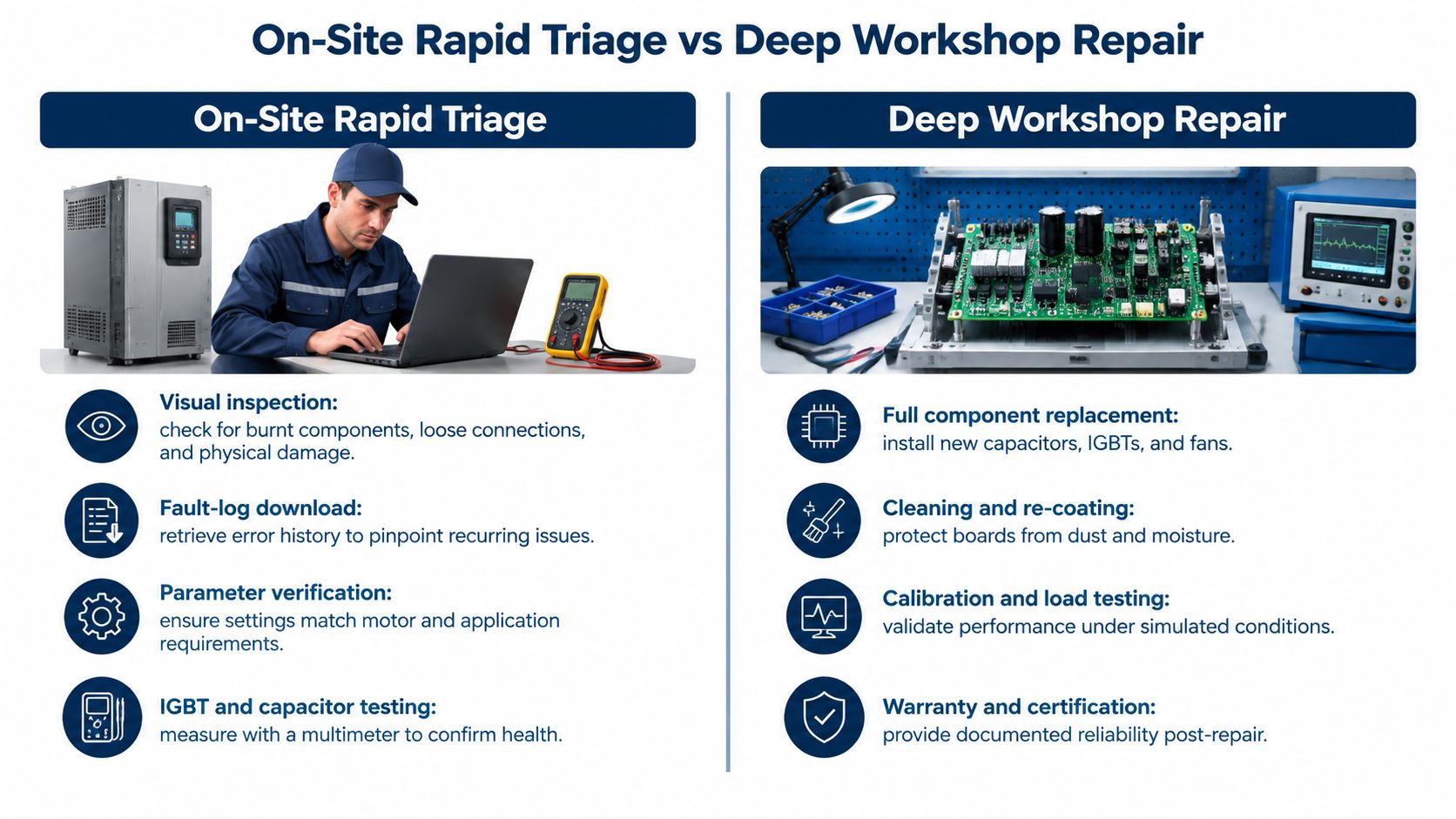
On-site triage is appropriate when the drive may be recoverable without removing major assemblies and when production pressure justifies immediate diagnosis. The engineer first makes the system safe, confirms the isolation state, and performs a visual inspection before applying test equipment. Burn marks, loose terminals, swollen capacitors, blocked airflow, damaged fans, and contamination can change the repair decision within minutes.
The diagnostic sequence should remain disciplined:
- Review the event history: Establish whether the fault is isolated or recurring.
- Verify parameters: Compare motor data, acceleration and deceleration settings, current limits, braking settings, and control mode with the approved backup.
- Check the power path: Inspect connections, measure relevant supply conditions, and look for evidence of imbalance or disturbance.
- Inspect cooling: Confirm fan operation, filter condition, heatsink airflow, and cabinet temperature.
- Test accessible components: Use appropriate meters and procedures to assess IGBTs, diodes, capacitors, and obvious shorts.
- Separate system causes: Check the motor, cable, mechanical load, command signal, and process interlocks before authorizing a restart.
On-site repair works well for a clear, localized issue, an available replacement subassembly, or a configuration problem. It works poorly when the symptom is intermittent, several power modules have failed, firmware integrity is uncertain, or the team lacks the parts and test equipment to prove the repair.
What the workshop adds
A workshop provides a controlled environment for ESD-safe PCB work, detailed component diagnosis, thermal inspection, insulation testing, oscilloscope measurements, controlled load testing, and documented reassembly. It also allows technicians to investigate secondary damage that may not be visible in a cabinet, particularly after a surge, thermal event, or power-module failure.
Workshop repair usually takes longer because the drive must be removed, transported, assessed, repaired, tested, and returned. The trade-off is stronger traceability and better evidence. A credible report should identify the failed parts, the suspected initiating cause, the tests performed, the parameter status, and the conditions under which the repaired unit passed.
Use this video as a visual supplement to the diagnostic sequence, not as a substitute for site-specific isolation and testing.
<iframe width="100%" style="aspect-ratio: 16 / 9;" src="https://www.youtube.com/embed/YVR6rHAjBdM" frameborder="0" allow="autoplay; encrypted-media" allowfullscreen></iframe>Deciding Whether to Repair or Replace the Drive
Repair and replacement should be treated as competing asset strategies, not as an automatic response to a failed component. A repair may preserve the existing panel, wiring, motor interface, parameters, and application behavior. Replacement may provide longer supportability, updated protection, improved integration, and a cleaner lifecycle plan.
Start with the asset's condition and operating history. A drive with one isolated failure, sound insulation, clean cooling paths, available parts, and stable application demand is a strong repair candidate. A unit with repeated trips, declining reliability, obsolete firmware, unavailable boards, and evidence of widespread thermal or contamination damage may justify replacement or a planned retrofit.
Questions that change the decision
- Age and supportability: Is the model approaching late-life status, and can compatible parts still be verified?
- Failure pattern: Does the same subsystem fail repeatedly, or was this a single external event?
- Production criticality: Can operations tolerate the repair window, or does the asset need an immediately available exchange unit?
- Application fit: Does the present drive still meet the motor, braking, control, and process requirements?
- Future ownership: Would repair defer another decision, or can the asset support the planned operating horizon?
- Root cause: Has the team corrected the supply, cooling, contamination, motor, cable, or load issue that caused the failure?
The most expensive mistake is repairing a drive without correcting the system cause. The second is replacing a healthy drive because a motor, cable, PLC command, or mechanical load created the alarm.
| Criterion | Lean Repair | Lean Replace |
|---|---|---|
| Fault history | Isolated, identifiable event | Repeated or unexplained failures |
| Parts | Verified parts and revision compatibility | Obsolete, unavailable, or uncertain parts |
| Physical condition | Limited damage and serviceable enclosure | Widespread heat, contamination, or structural damage |
| Downtime | Repair window fits the production plan | Immediate recovery requires an exchange or new unit |
| Controls | Existing parameters and interfaces remain suitable | Integration, protection, or control requirements have changed |
| Lifecycle | Repair supports a defined operating horizon | Replacement provides a clearer long-term support path |
A simple scoring sheet helps operations and maintenance agree on the call. Rate each criterion as favorable for repair, favorable for replacement, or unresolved. Don't approve either path while the root-cause field remains unresolved.
On-Site Reconditioning for MV Drives and Spare-Part Strategy
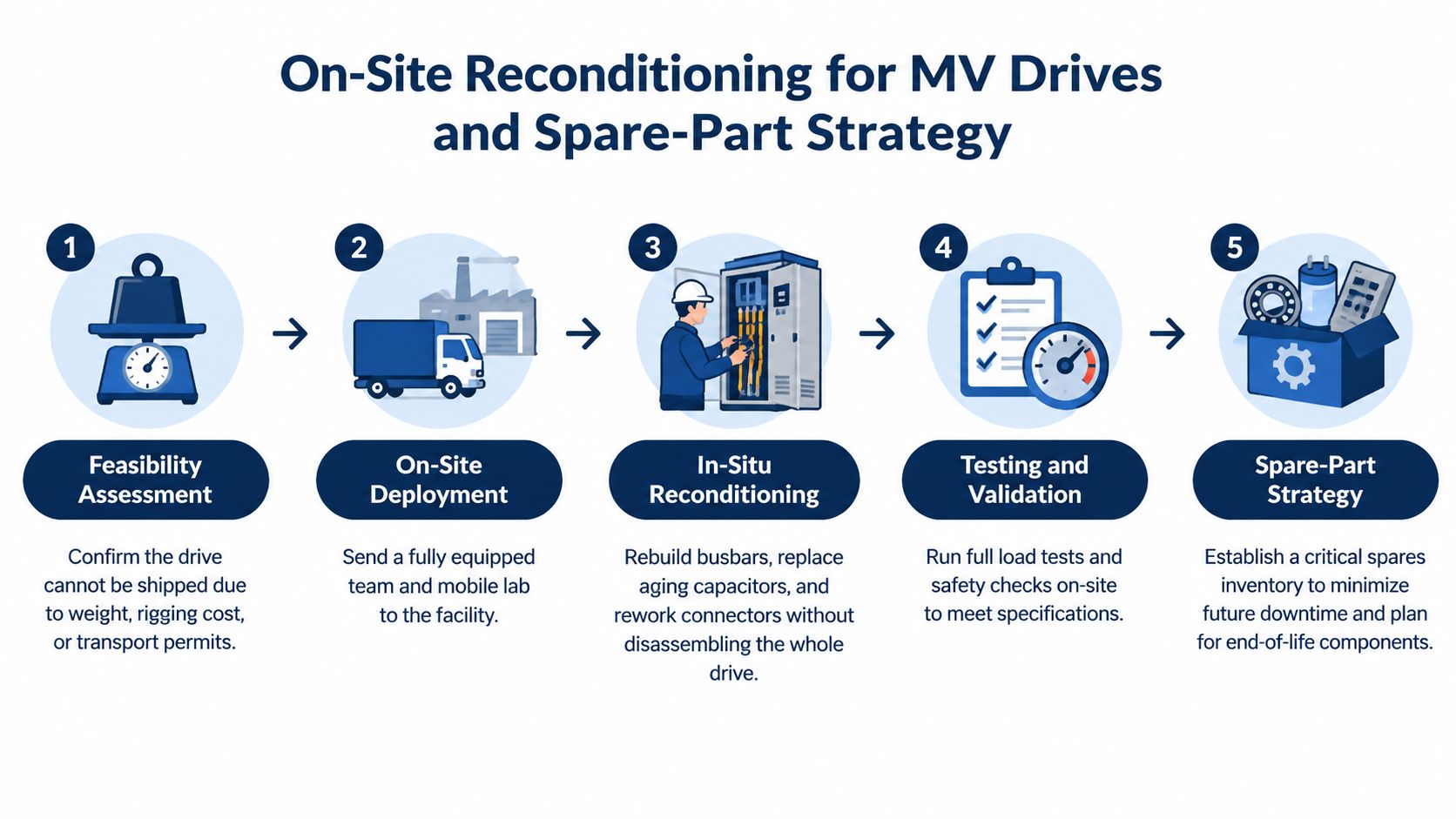
Medium-voltage drives often create a logistics problem before they create a technical one. Weight, lifting requirements, transport permits, busbar modifications, and outage risk can make shipment impractical. In that situation, on-site MV reconditioning brings the diagnostic and repair capability to the installed cabinet.
The work begins with a feasibility assessment and a controlled work zone. The team reviews isolation boundaries, lifting arrangements, access, ventilation, fire controls, permits, and the planned testing sequence. Depending on the findings, the intervention may include a partial-discharge survey, gate-driver board replacement, power-stack module exchange, capacitor work, cooling-circuit refurbishment, connector or busbar repair, and recommissioning.
A controlled on-site sequence
- Confirm the repair boundary: Identify whether the failure is confined to a module or has affected upstream and downstream assemblies.
- Inspect and test: Record insulation condition, connection integrity, cooling performance, and relevant power-stage measurements.
- Replace or recondition: Install verified modules, boards, capacitors, connectors, or cooling components according to the approved scope.
- Recommission carefully: Perform no-load checks first, then controlled motor runs and loaded operation when the system is ready.
- Close the evidence trail: Record test results, firmware status, parameter backups, replaced part numbers, and outstanding recommendations.
The spare-parts strategy starts before the outage. Identify each critical part by OEM part number, revision code, electrical rating, and physical interface. Cross-reference alternatives only after confirming compatibility. A part that fits mechanically may still be wrong for the gate-driver revision, firmware family, insulation system, or protection scheme.
Pre-dispatch verification should include incoming inspection, documentation review, appropriate insulation or hipot testing of power modules, and confirmation that the firmware version matches the control architecture. A spare that arrives without those checks can consume the same outage it was meant to prevent.
The broader market context supports this lifecycle approach. One industry estimate valued the global VFD market at USD 28.38 billion in 2024 and projected USD 39.67 billion by 2030, with a 5.9% CAGR from 2025 to 2030. The referenced market estimate illustrates the size of the installed base that requires support after commissioning. A separate estimate placed the 2024 market at USD 32.3 billion, projected USD 48.7 billion by 2033, and reported that Asia-Pacific held over 34.5% in 2024. The market overview containing those figures also reinforces why regional spare holding and field capability matter.
Service Levels, Timelines, and What to Demand from a Provider
A repair provider's promise should describe evidence and decision points, not just arrival speed. Emergency callout, on-site diagnosis, workshop repair, and MV reconditioning have different constraints. Parts availability, access permits, isolation requirements, test facilities, and the complexity of the failed subsystem all affect completion.
Ask for a written service scope before work begins. It should state what the provider will inspect, which tests are included, how the team will handle an unconfirmed root cause, and what happens if the drive is beyond economical repair.
| Service Type | Typical Response | Typical Completion | Key Deliverables | Warranty |
|---|---|---|---|---|
| Emergency on-site response | Agreed regional or remote response window | Based on fault scope and parts availability | Fault capture, safe triage, parameter review, restart recommendation | Written terms for replaced work |
| On-site rapid triage | Planned technician dispatch | Same intervention where the cause is localized | Photos, readings, fault history, findings, next-step recommendation | Scope-dependent |
| Workshop deep repair | Collection after diagnosis and approval | Depends on parts, testing, and repair complexity | Bench report, parts traceability, test record, parameter backup | Written workmanship terms |
| MV on-site reconditioning | Scheduled specialist deployment | Defined outage window including load testing | Inspection record, replacement list, test certificate, recommissioning data | Written project warranty |
A credible report should include the root-cause statement, not merely “IGBT failed.” It should explain whether the failure appears consistent with overheating, supply disturbance, contamination, load behavior, poor connection, or internal aging, and identify what remains unproven.
Evidence that should leave the site
- Parameter records: Approved backup, changed values, and final verified settings.
- Electrical readings: Supply measurements, insulation results where applicable, and recorded test conditions.
- Visual evidence: Cabinet, cooling path, terminals, damaged parts, and corrective work.
- Test proof: Functional sequence, waveforms or relevant measurements, no-load checks, and loaded results where performed.
- Parts traceability: Part numbers, revisions, quantities, and whether components were new, reconditioned, or exchange items.
- Warranty terms: Coverage boundaries, exclusions, start date, and response process.
Warning signs include vague delivery commitments for obsolete parts, no documented bench capability for PCB work, no suitable load-testing arrangement for the drive class, and a refusal to separate confirmed findings from assumptions. A provider should be able to explain what it knows, what it suspects, and what test will resolve the uncertainty. Teams evaluating the service scope can review this VFD repair services overview as a reference point for workshop, preventive, troubleshooting, and reconditioning activities.
A Practical Checklist for Your Next Drive Event
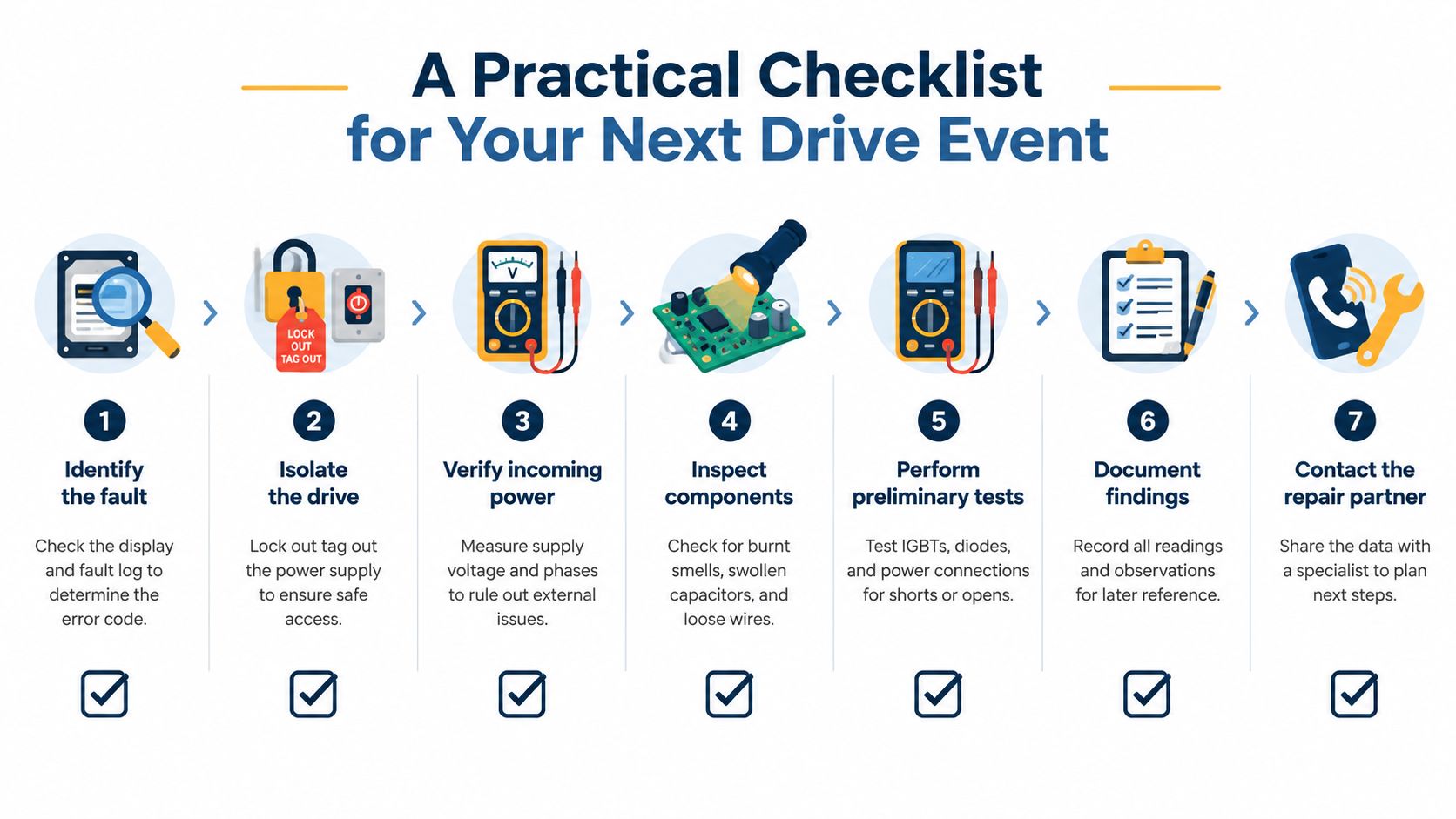
Give the shift team a short procedure they can follow before the specialist arrives. The first hour should preserve evidence, protect people, and prevent a false diagnosis.
- Capture the fault: Photograph the display and record the complete alarm history before resetting.
- Confirm the parameter backup: Identify the last approved file and note any recent changes.
- Make the system safe: Apply the site's isolation and lockout procedures before opening the cabinet or testing.
- Inspect the environment: Check temperature, dust, humidity, filters, fans, heatsinks, moisture, and visible damage.
- Verify the system: Measure incoming supply conditions and check motor and cable insulation using approved procedures.
- Separate the cause: Decide whether the evidence points to the drive, motor, cabling, process, mechanical load, or an interaction between them.
- Choose the response: Select on-site triage, workshop repair, MV reconditioning, exchange, or replacement based on evidence and asset condition.
- Brief the provider: Send the model, ratings, fault history, photos, parameters, readings, application details, and production constraints.
- Update the asset record: File the diagnosis, root cause, replaced parts, test results, final parameters, and follow-up actions.
DUCHENG Industrial provides multi-brand VFD troubleshooting, workshop repair, preventive maintenance, and on-site reconditioning for industrial drive systems across China and Southeast Asia. If your team needs a structured fault assessment or support choosing between repair, reconditioning, and replacement, visit DUCHENG Industrial and submit the drive details before the next outage becomes an avoidable production loss.