
A practical variable frequency drive maintenance playbook covering inspections, shutdown tasks, reconditioning, spare parts, and Smart O&M integration for 2026.
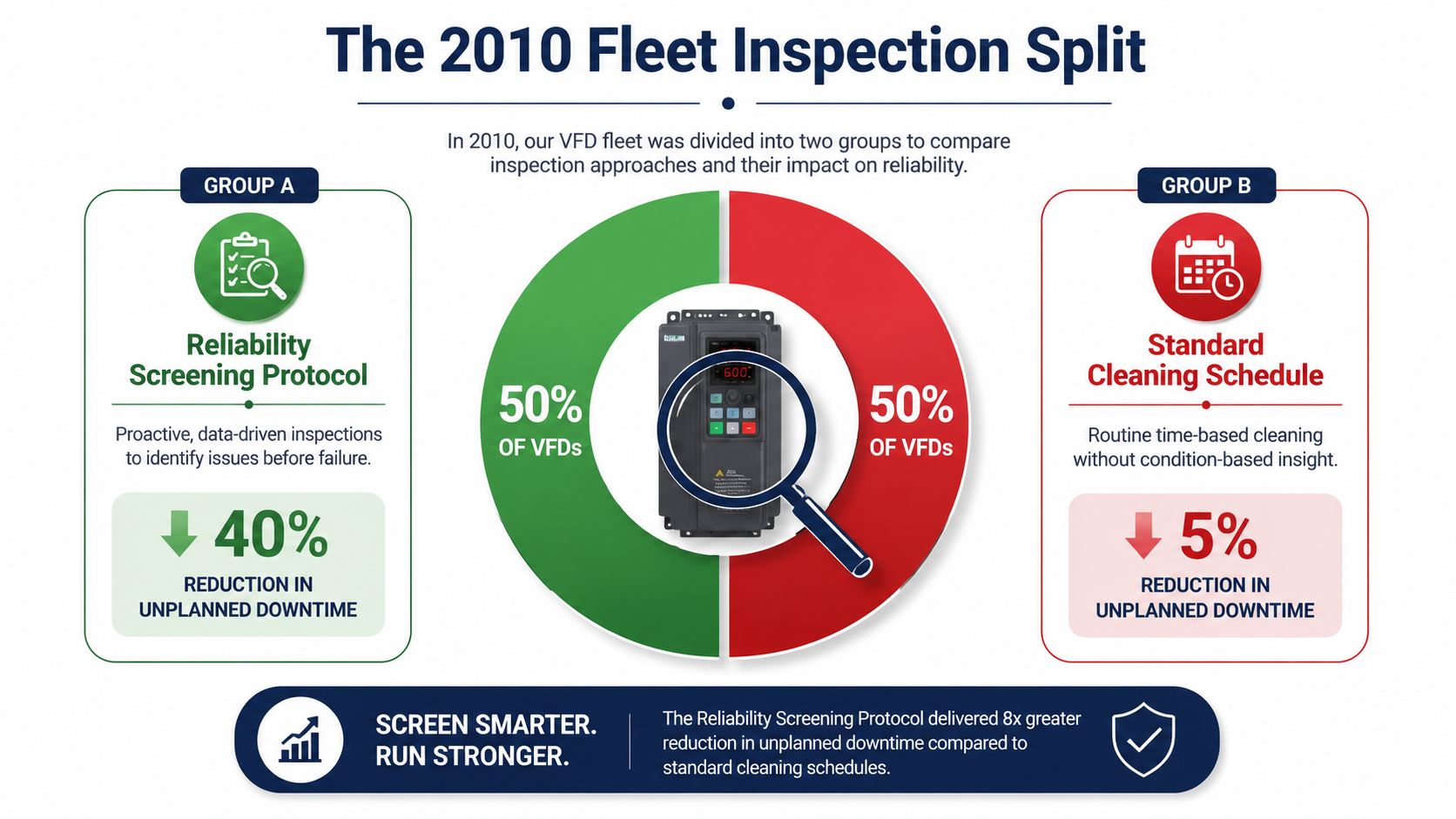
A 2010 fleet inspection of variable frequency drives found that only 33% were problem-free. Another 47% had problems that didn't require replacement parts, while 20% required parts after a formal preventive-maintenance process. In practical terms, roughly two-thirds of the inspected drives had a defect or service need that technicians could identify before the drive became a hard failure. The documented fleet inspection split changes the maintenance question. The issue isn't whether a cabinet looks clean. It's whether your inspection routine can expose the failure developing behind the keypad.
Variable frequency drive maintenance works best as a reliability screening discipline. Cleaning matters, but it only matters because dust raises thermal resistance, blocked airflow stresses cooling components, and contamination can turn a small electrical weakness into a trip during production. The useful program connects every inspection task to a failure mode, a decision, and a planned response.
Table of Contents
- Why Most VFD Maintenance Programs Miss the Point
- Building the Inspection Cadence That Prevents Trips
- On-Site Reconditioning Versus Shipping to a Workshop
- Spare Parts Verification Before a Single Swap
- Folding Smart O&M and IoT Monitoring Into Your Routine
- When to Repair, Recondition, or Replace a Drive
- Putting the Program to Work in the Next Quarter
Why Most VFD Maintenance Programs Miss the Point
Most VFD checklists are built around visible work. Clean the enclosure, inspect the filters, tighten terminals, record the parameters, and close the work order. Those tasks have value, but they're incomplete when the checklist treats the drive as an opaque box rather than a collection of aging subsystems.
A drive can look normal while its electrolytic capacitors lose effective performance, a fan bearing develops drag, or a DC bus connection begins to heat under load. A board replacement can also introduce firmware or parameter incompatibility that won't appear until the motor accelerates. The inspection should therefore answer a more useful question: which failure mode is this task intended to catch?
Turn checklist items into failure controls
Use the inspection record to show the connection:
- Airflow inspection: Finds blocked filters, contaminated heatsinks, and failed fans before heat causes an overtemperature trip.
- Thermal scanning: Reveals loose power connections, uneven phase loading, and abnormal heating at modules or bus capacitors.
- Capacitor assessment: Identifies aging DC-link components before undervoltage, ripple, or startup instability interrupts operation.
- Parameter and firmware review: Prevents a replacement control board from rejecting the installed parameter set or applying an unsuitable configuration.
- Terminal verification: Finds looseness that can produce phase-loss faults, localized heating, or intermittent control behavior.
The schedule should then reflect the drive's real exposure. A clean, cool enclosure serving a lightly loaded auxiliary system doesn't need the same attention as a heavily loaded drive in a hot, dusty, corrosive process area. Environmental control is a reliability lever because heat, contamination, and aging accelerate chronic drive failures. Field-oriented reliability guidance for AC drives describes routine checks around operating conditions, cooling, filters, and component life.
Screen the fleet by consequence
Criticality belongs in the maintenance plan, not just in the risk register. A single drive that controls a production bottleneck needs a different spare strategy and inspection depth from a redundant pump drive. A drive older than ten years also deserves more than a visual capacitor check. Its inspection should include a documented health assessment of the capacitor bank and a review of replacement availability for control and power assemblies.
The cost of a structured inspection is usually easy to justify when compared with the consequences of an unplanned trip. Production loss, scrap, emergency labor, restart energy, and secondary equipment stress can all exceed the planned maintenance effort. The exact exposure depends on the process, but the operating principle is consistent: find latent defects during a controlled window, not during a demand event.
Practical rule: If the work order doesn't identify the failure mode being screened, it's probably a cleaning task with paperwork attached.
Building the Inspection Cadence That Prevents Trips
A useful cadence combines short operational checks with deeper inspections during planned access windows. Daily work must be brief enough to happen consistently. Annual work should justify isolation, testing, and recommissioning. Each task should target a failure mode, not merely complete a form.
Daily and weekly checks
Daily operators or electrical technicians should look for changed conditions rather than attempt a full service:
- Visual condition: Check enclosure doors, filter indicators, alarm lights, keypad messages, and signs of moisture or contamination. Blocked filters restrict cooling flow and can drive the unit toward thermal protection.
- Sound and airflow: Listen for abnormal fan noise and confirm consistent exhaust airflow. A fan may keep spinning while its bearing or motor deteriorates.
- Operating pattern: Note unusual current, speed instability, repeated resets, or new fault indications. A drive that has not tripped may still be recording an emerging problem.
Weekly checks should include the fault buffer, cooling fan operation, enclosure temperature, and basic electrical readings appropriate to the drive. Recurring records commonly cover temperature, humidity, bus voltage, output voltage, current, and frequency. Filters need more frequent attention, while deeper inspection belongs in planned service. The maintenance guidance and reliability benchmark links preventive work with a reported reduction in annual failures from 10 to 2 after maintenance was introduced.
Monthly and quarterly work
Monthly work should focus on contamination and airflow. Clean or replace filters according to condition, inspect heatsink passages, verify fan guards, and check for dust at the cabinet intake. Do not blow contamination deeper into electronics without controlling where debris goes. Use the approved enclosure cleaning method and follow the drive's safety requirements.
Quarterly inspections separate a working reliability program from a basic annual checklist:
- Perform a thermal scan of power modules, bus connections, and capacitor areas while the drive carries a meaningful load.
- After isolation and discharge, check power and control terminals for correct torque.
- Verify that heatsink and enclosure airflow paths remain open.
- Review fault history for repeating events, not only active alarms.
- Compare key readings with earlier records instead of judging them in isolation.
| Cadence | Task | Failure Mode Prevented |
|---|---|---|
| Daily | Visual alarm, filter, moisture, and airflow check | Blocked cooling path and unnoticed fault escalation |
| Weekly | Fault-log review and operating-condition readings | Repeating trips and abnormal thermal loading |
| Monthly | Filter service and cabinet contamination inspection | Dust-driven overheating and restricted airflow |
| Quarterly | Thermal scan, terminal verification, and trend comparison | Loose connections, phase imbalance, and hot power components |
| Annual | Deep cleaning, insulation testing, component review, and recommissioning checks | Aging insulation, capacitor deterioration, fan failure, and configuration errors |
Use a documented preventive-maintenance checklist as a starting point, then adjust the cadence for criticality, environment, duty cycle, and age. Service recommendations commonly place fan replacement around a 3–5 year interval and DC bus capacitor attention around 7 years, but these are planning references, not permission to ignore condition data. The published maintenance guidance supports considering service life and operating conditions together.
Record the result against the failure mode screened. That makes the next inspection more useful and shows whether a recurring trip is developing between scheduled visits.
On-Site Reconditioning Versus Shipping to a Workshop
For medium-voltage drives, the repair location can determine the outage risk as much as the failed component does. Shipping a large drive or power assembly to a workshop may provide better bench access, but removal, rigging, transport, inspection, repair, return logistics, installation, and recommissioning extend the recovery chain.
On-site Blue Reconditioning brings qualified personnel, test equipment, replacement subsystems, and controlled procedures to the installed drive. That approach avoids transport damage, complex lifting arrangements, and the possibility that a critical process remains down while a repair moves between locations. It's particularly useful when the drive is a single point of failure and the maintenance window is narrow.
Workshop work still has a legitimate place. Smoke damage, chemical ingress, severe contamination, or suspected internal mechanical damage may require disassembly in a controlled environment. A workshop can also provide bench instrumentation and a clearer setting for root-cause analysis when the failure is complex or recurring.
| Decision Factor | On-Site Reconditioning | Workshop Shipment |
|---|---|---|
| Downtime tolerance | Suits critical process lines with limited outage windows | Suits redundant assets or planned long outages |
| Transport exposure | Removes shipping and handling risk for installed assemblies | Adds removal, packing, logistics, and return-installation steps |
| Contamination severity | Works for serviceable contamination that can be controlled on site | Better for smoke, chemical ingress, or extensive internal contamination |
| Testing environment | Uses field testing and controlled recommissioning | Provides bench diagnostics and deeper disassembly capability |
| Asset criticality | Favors single-point-of-failure drives | Acceptable when another drive can carry the process |
| Schedule | Typical on-site MV reconditioning can complete within five to ten days | Workshop shipment, repair, logistics, and recommissioning can take three to six weeks |
Those time ranges are planning figures for the service paths described, not guarantees for every make, failure, or site condition. The practical rule is straightforward: if removing the drive would shut down a critical process for more than 72 hours, on-site reconditioning is usually the lower-risk path. The decision should still account for safe access, available test equipment, contamination level, and the repair team's ability to verify the drive before energization.
Spare Parts Verification Before a Single Swap
A replacement drive that doesn't match the installed configuration can create a second outage immediately after the first one. Pre-staging should therefore begin with records, not with a forklift.
Start by comparing the spare's model, power assembly, control architecture, firmware revision, and parameter file against the installed unit. A parameter file that loads successfully isn't automatically correct. Review the differences line by line, then confirm motor data, acceleration and deceleration behavior, protection settings, communication mapping, and any application-specific logic.
Verify the electrical match
The gate driver board deserves particular attention. Confirm its part number against the rectifier or inverter stack, because a board that looks physically compatible may not provide the expected drive characteristics or feedback arrangement. On medium-voltage equipment, also verify isolation components, fiber connections, voltage-detection boards, and power-supply interfaces before dispatch.
Stage the supporting items with the chassis:
- Cooling fan: Confirm the voltage, connector, airflow direction, and control feedback. An uncalibrated or incompatible fan can create a thermal fault after a successful swap.
- Keypad or display assembly: Check communication compatibility and retain the correct access credentials and parameter records.
- Communication module: Verify the network interface, address documentation, and control-system mapping.
- Power components: Match cell, module, board, and connector identifiers against the approved bill of materials.
Make the paperwork part of the hardware
The incoming inspection log should record physical condition, identification labels, visible contamination, and any transport damage. Add a firmware difference sheet, an insulation-resistance baseline recorded at receipt, and a one-line note showing the spare's last bench-test date.
That documentation gives the planner a usable status before the work order prints. It also prevents the common failure pattern where a technician discovers a mismatch only after the production window has opened.
A spare isn't ready because it's on the shelf. It's ready when its identity, configuration, condition, and test history are visible to the person dispatching it.
Folding Smart O&M and IoT Monitoring Into Your Routine
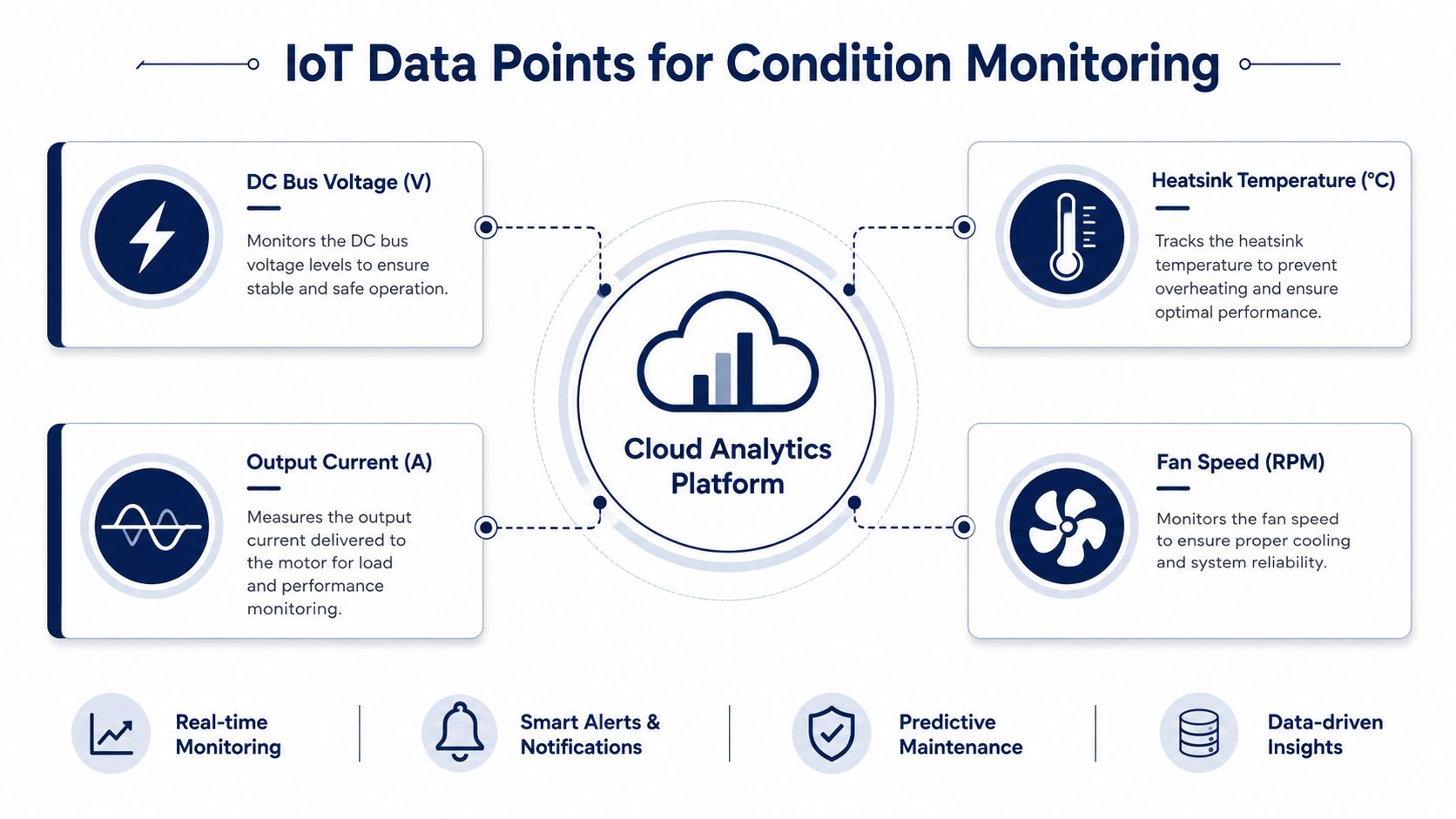
IoT monitoring should sharpen the existing PM rhythm, not replace it. The calendar visit still matters because technicians need to inspect physical condition, verify airflow, check connections, and understand what changed in the enclosure. Monitoring adds a continuous view between those visits and helps move work from calendar-based replacement toward condition-based intervention.
The most useful signals are the ones that map directly to a known failure mode:
- DC bus capacitor ESR drift: Shows electrical aging that a visual inspection may miss.
- Heatsink temperature rise above ambient: Helps separate normal load heating from worsening cooling or contamination.
- Cooling-fan current waveform: Can reveal bearing drag, imbalance, or motor deterioration before the fan stops.
- Input phase-loss events in the fault buffer: Helps identify upstream supply or termination problems that may otherwise be mistaken for drive defects.
- Bus voltage, output current, and frequency: Provide operating context for every alarm and trend.
Create work orders, not noisy alarms
A monitoring system should distinguish between an urgent protection event and a slowly worsening condition. For example, if capacitor ESR trends above 1.5 times its baseline, the system should open a planned work order for assessment ahead of the next maintenance window, rather than generate an immediate emergency alarm. That threshold is a practical example of condition-based logic. Each site should validate it against the drive design, measurement method, load profile, and manufacturer limits.
The historian should capture the drive's fault codes, warning codes, reset history, temperature, bus voltage, output current, frequency, fan behavior, and relevant ambient conditions. Refresh the dashboard often enough to expose developing trends, but don't make the technician watch every transient. A condition-monitoring workflow for industrial equipment should include alert ownership, escalation rules, and a clear suppression policy for known nuisance events.
A good rule is to suppress repeated alerts until the underlying condition changes meaningfully, while preserving the event count and history for review. The on-call technician should trust that a notification represents a decision-worthy change, not another harmless fluctuation.
The video below can help teams align monitoring concepts with the physical measurements collected at the drive.
<iframe width="100%" style="aspect-ratio: 16 / 9;" src="https://www.youtube.com/embed/GHfr_8nRH6o" frameborder="0" allow="autoplay; encrypted-media" allowfullscreen></iframe>When to Repair, Recondition, or Replace a Drive
The repair decision should be made at the subsystem level, not by looking at the age of the enclosure and declaring the whole drive obsolete. One failed gate driver board, fan tray, or capacitor bank doesn't automatically justify a complete changeout. The right comparison includes component cost, labor, commissioning time, configuration risk, spare availability, and the consequences of disturbing healthy assemblies.
A repair is usually appropriate when one subsystem has failed and the remaining power stage, control system, insulation, cooling path, and mechanical structure test healthy. The work should include root-cause confirmation, not just component substitution. If the same board fails again after restart, the team should investigate gate signals, power quality, cooling, wiring, and load behavior before closing the job.
Use the dominant failure mode
| Dominant Failure Mode | Recommended Path | Decision Trigger |
|---|---|---|
| Single control, driver, or power-supply fault | Repair | One subsystem fails, while the rest of the drive passes inspection and functional testing |
| Contamination, heat stress, or aging capacitors | Recondition | The enclosure and assemblies remain serviceable, but cleaning, cooling work, or capacitor replacement is needed |
| Multiple failed switching devices across phases | Replace or major rebuild | The power stack has broad damage, repeated device failures, or unsupported assemblies |
| Obsolete controls with no reliable spare path | Upgrade or replace | Future repairability and configuration support are no longer acceptable |
| Repeated trips with no isolated component fault | Diagnose before deciding | Fault history indicates a system, load, supply, or installation problem |
On medium-voltage drives, a full swap can demand substantial re-termination, phasing checks, protection verification, and commissioning labor. Those tasks can erase the apparent savings of a new enclosure, particularly when the existing transformer interface, motor cable arrangement, and control integration are stable.
A $40,000 board swap inside a $400,000 drive is the better reliability bet than a wholesale changeout triggered by one trip, provided those amounts apply to the actual project and the board repair resolves the root cause. That example is an economic frame, not a universal rule. The final call should follow test evidence and lifecycle support.
Repair the failed subsystem when the evidence supports it. Replace the drive when the failure pattern shows that the platform, not just the component, has become the risk.
Putting the Program to Work in the Next Quarter
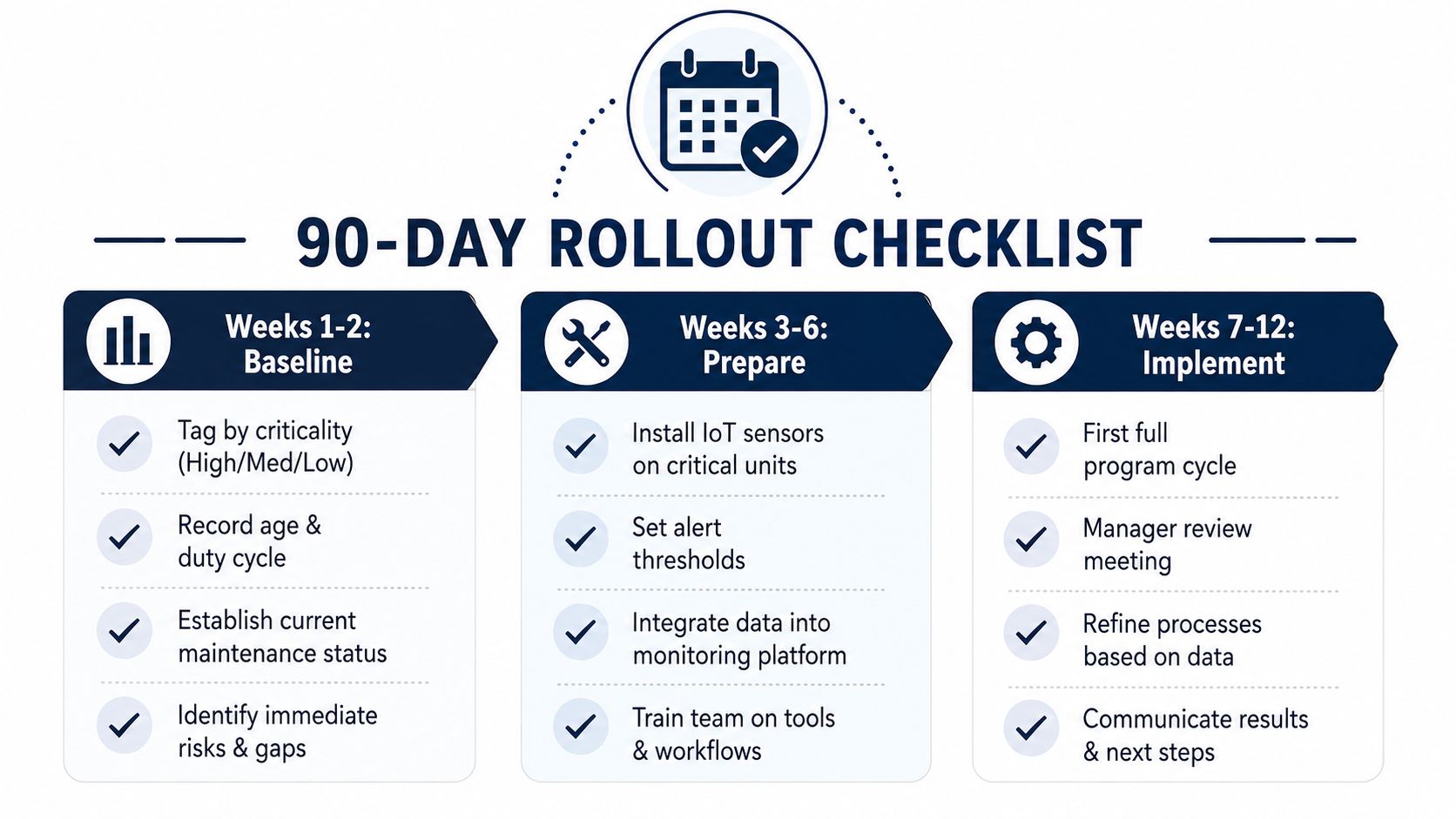
A maintenance manager can establish a stronger VFD program during the next quarter without waiting for a major capital project. The first requirement is a clean fleet register. Without one, the CMMS stores tasks but not risk.
Weeks one and two, establish the baseline
Build a record for every drive that includes age, voltage class, duty cycle, environment, motor application, last trip date, recurring fault codes, spare status, and service history. Tag each asset by criticality, such as high, medium, or low, then connect that tag to the acceptable outage window and recovery path.
High-criticality drives should have verified exchange parts, named technical contacts, and a defined on-site or workshop decision. Lower-criticality units may rely on planned shipment, provided the process has redundancy and the spare strategy supports that choice.
Weeks three and four, put the cadence into the CMMS
Create daily, weekly, monthly, quarterly, and annual task templates. Assign named owners for operator visual checks, dust audits, thermal scans, fault-log reviews, and the annual shutdown window. Attach measurable condition triggers to work orders, including rising temperature, worsening fan behavior, repeated phase-loss events, and capacitor health changes.
Don't assign every drive the same task depth. The CMMS should generate more demanding inspections for hot, dusty, corrosive, heavily loaded, or high-consequence assets.
Weeks five through eight, test the recovery path
Run the spare-parts verification process against a real exchange unit, even if the drive isn't currently failed. Check firmware, parameter compatibility, gate-driver identification, fan assemblies, communication hardware, insulation baseline, and bench-test records. Record every mismatch and revise the receiving checklist before the next outage.
Add the on-site reconditioning provider, workshop repair contact, OEM support route, rigging resource, and electrical testing lead to the rapid-restore roster. A fault response is faster when people know who owns diagnosis, isolation, parts approval, and recommissioning.
Weeks nine through twelve, add monitoring and review the results
Enable condition monitoring on the parameters most likely to prevent nuisance trips. Start with heatsink temperature, DC bus behavior, output current, fan condition, and fault-buffer events, then validate each alert with technicians before expanding coverage.
Close the quarter with a manager review that examines:
- Reliability: Review MTBF trends and recurring fault families.
- Availability: Track unplanned downtime hours and the assets responsible.
- Maintenance economics: Compare cost per kW managed, emergency labor, parts consumption, and planned work.
- Execution quality: Check completed inspections, overdue tasks, validated spares, and commissioning records.
- Learning: Convert every failed swap or nuisance alert into a checklist or threshold improvement.
For new installations, use a commissioning escort. Have the maintenance owner present during parameter loading, motor rotation checks, protection verification, control-system integration, and the first operating window. Capture the baseline readings before production begins, because condition monitoring is only useful when the starting condition is known.
DUCHENG Industrial provides multi-brand VFD commissioning support, preventive care, troubleshooting, workshop repair, on-site Blue Reconditioning for medium- and high-voltage drives, spare-parts verification, and Smart O&M consulting. Visit DUCHENG Industrial to discuss a maintenance cadence, recovery plan, or reconditioning scope for your site's critical drives.